Monitor Any Website for Changes and Get a Telegram Alert (n8n Template)
You want to know the moment a price drops, a job posting goes live, or a competitor quietly rewrites their pricing page. But most sites don't expose an API, and you're not going to sit there refreshing them by hand.
This workflow does the watching for you. It polls a page on a schedule, compares it against the last version it saw, and sends a Telegram message the second anything actually changes. Six nodes. Runs forever for the cost of a cheap VPS.
This is a workflow template in the Data & Monitoring family — the part of our Workflows section that was previously empty. Drop it in, point it at a URL, and stop refreshing.
The use case
- Problem: A page you care about changes without warning, and there's no feed, webhook, or API to subscribe to. Manual checking means you either miss it or waste time.
- Tools: n8n (Schedule Trigger → HTTP Request → a small Code node → IF → Telegram), plus a small text file that stores the last-known state.
- Outcome: A Telegram alert within minutes of any real change, running unattended 24/7.
Myth vs. Reality
Myth: "I need the site's API." Reality: an HTTP request plus a content hash covers any page that returns HTML — no API required.
Myth: "It'll spam me." Reality: we hash the content and only alert when the hash changes. Static pages stay silent.
Myth: "This is advanced." Reality: the whole thing is six nodes, and the tricky part is one short Code node.
How it works
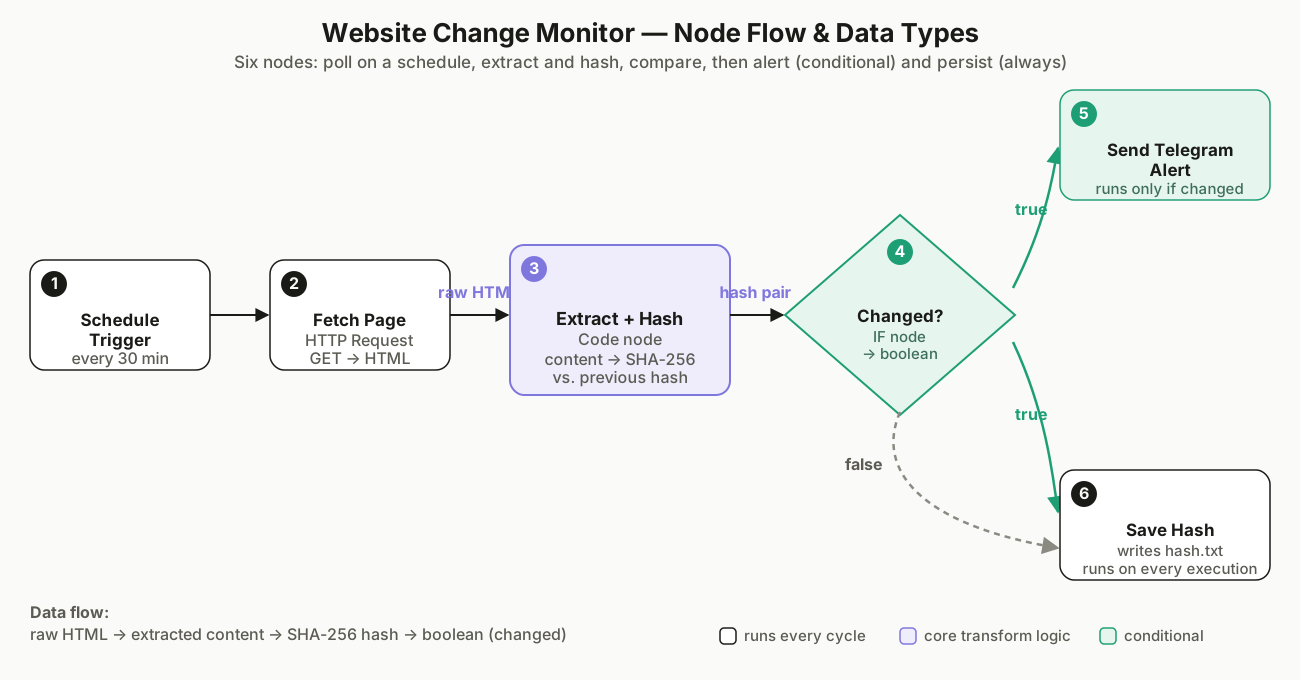
- Schedule Trigger fires every 30 minutes (tune to your patience and the site's update frequency).
- Fetch Page sends a GET request to the target URL and returns the HTML.
- Extract + Hash pulls out only the region you care about (e.g. the
<main>block), collapses whitespace, hashes it with SHA-256, and compares it to the previously stored hash. - Changed? is a simple IF:
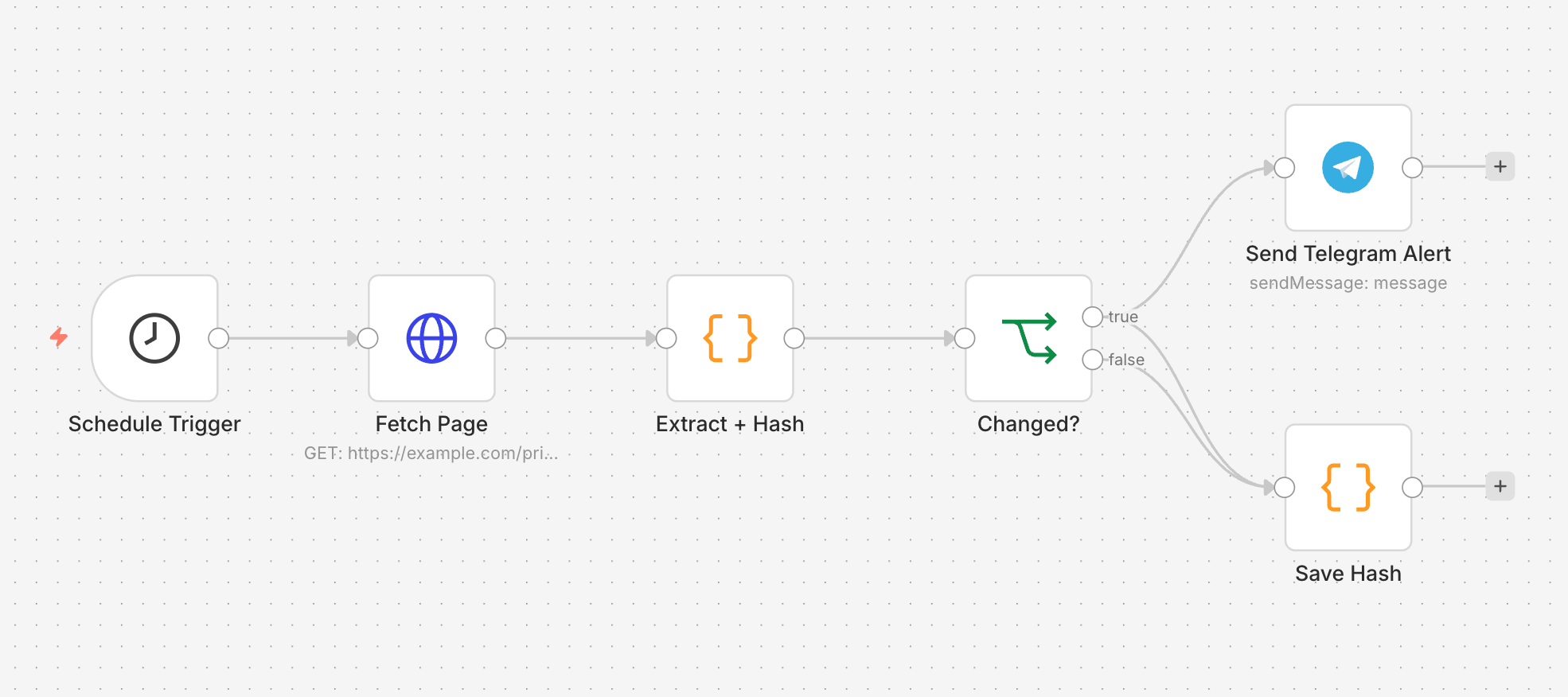
changed == true. - On true, Send Telegram Alert posts a message. On both branches, Save Hash writes the new hash so the next run has something to compare against.
Build it in n8n
If you haven't installed n8n yet, see How to Install n8n: 3 Ways — local, desktop, or self-hosted all work. The HTTP Request step here uses the exact same pattern as giving an AI agent web access, so if that concept is new, read that first.
The Telegram node is the same one we use in How to Add Human Approval to AI Agent Workflows with n8n and Telegram — set up the bot once and reuse the credential across workflows.
Prerequisite — read this before you import. Both Code nodes below use Node's built-infsmodule to read and write the hash file. On self-hosted n8n, that module is sandboxed by default; you need to set the environment variableNODE_FUNCTION_ALLOW_BUILTIN=fs(or*) when you start n8n, or the workflow will fail with a "Cannot find module 'fs'" error the first time it runs. On n8n Cloud,fsisn't available at all — swap both file reads/writes for an n8n Data Table, a Google Sheet row, or a Redis key instead. The compare-and-alert logic stays identical either way.
Node-by-node
| Node | Type | Key settings |
|---|---|---|
| Schedule Trigger | scheduleTrigger |
Interval → 30 minutes |
| Fetch Page | httpRequest |
Method GET, URL = your target |
| Extract + Hash | code |
JS below |
| Changed? | if |
{{ $json.changed }} equals true |
| Send Telegram Alert | telegram |
chatId + message text |
| Save Hash | code |
JS below — runs on both IF branches |
Extract + Hash (the heart of it):
const crypto = require('crypto');
const fs = require('fs');

// 1. Raw HTML returned by the HTTP Request node
const html = $input.item.json.body || $input.item.json.data || '';

// 2. Extract the part you care about.
//    Example: keep only the <main> block. Swap the regex for a
//    CSS-selector slice or a string match that fits your page.
const match = html.match(/<main[\s\S]*?<\/main>/i);
const content = (match ? match[0] : html)
  .replace(/\s+/g, ' ')   // collapse whitespace
  .trim();

// 3. Load the previously stored hash (empty on first run)
const storePath = '/data/website-monitor/hash.txt';
let previous = '';
try { previous = fs.readFileSync(storePath, 'utf8').trim(); } catch (e) {}

// 4. Hash the current content and compare
const current = crypto.createHash('sha256').update(content).digest('hex');
const changed = previous !== '' && previous !== current;

return [{ json: { changed, currentHash: current, previousHash: previous } }];
Save Hash (runs on both branches of the IF, so state is always current — writing plain text directly avoids the binary-file conversion that n8n's built-in file-write node would otherwise require):
const fs = require('fs');
const path = require('path');

const storePath = '/data/website-monitor/hash.txt';
const hash = $input.item.json.currentHash;

// Make sure the folder exists (first run on a fresh volume)
fs.mkdirSync(path.dirname(storePath), { recursive: true });
fs.writeFileSync(storePath, hash, 'utf8');

return [{ json: { saved: true, hash } }];
The template (copy-paste ready)
Import this JSON into n8n via Workflows → Import from File. Replace the placeholder URL, chat ID, and Telegram credential, then activate.
{
  "name": "Website Change Monitor → Telegram",
  "nodes": [
    {
      "parameters": {
        "rule": { "interval": [ { "field": "minutes", "minutesInterval": 30 } ] }
      },
      "name": "Schedule Trigger",
      "type": "n8n-nodes-base.scheduleTrigger",
      "typeVersion": 1.2,
      "position": [240, 320]
    },
    {
      "parameters": {
        "url": "https://example.com/pricing",
        "options": {}
      },
      "name": "Fetch Page",
      "type": "n8n-nodes-base.httpRequest",
      "typeVersion": 4.2,
      "position": [460, 320]
    },
    {
      "parameters": {
        "jsCode": "const crypto = require('crypto');\nconst fs = require('fs');\n\nconst html = $input.item.json.body || $input.item.json.data || '';\nconst match = html.match(/<main[\\s\\S]*?<\\/main>/i);\nconst content = (match ? match[0] : html).replace(/\\s+/g, ' ').trim();\n\nconst storePath = '/data/website-monitor/hash.txt';\nlet previous = '';\ntry { previous = fs.readFileSync(storePath, 'utf8').trim(); } catch (e) {}\n\nconst current = crypto.createHash('sha256').update(content).digest('hex');\nconst changed = previous !== '' && previous !== current;\n\nreturn [{ json: { changed, currentHash: current, previousHash: previous } }];"
      },
      "name": "Extract + Hash",
      "type": "n8n-nodes-base.code",
      "typeVersion": 2,
      "position": [680, 320]
    },
    {
      "parameters": {
        "conditions": {
          "options": { "caseSensitive": true, "typeValidation": "strict" },
          "conditions": [
            {
              "leftValue": "={{ $json.changed }}",
              "rightValue": true,
              "operator": { "type": "boolean", "operation": "equals" }
            }
          ]
        }
      },
      "name": "Changed?",
      "type": "n8n-nodes-base.if",
      "typeVersion": 2,
      "position": [900, 320]
    },
    {
      "parameters": {
        "chatId": "123456789",
        "text": "=# Website changed\n\nNew hash: {{ $json.currentHash.slice(0, 8) }}\nTime: {{ $now.toFormat('yyyy-LL-dd HH:mm') }}\nPrevious: {{ $json.previousHash.slice(0, 8) }}",
        "additionalFields": {}
      },
      "name": "Send Telegram Alert",
      "type": "n8n-nodes-base.telegram",
      "typeVersion": 1.2,
      "position": [1140, 200],
      "credentials": {
        "telegramApi": { "id": "YOUR_TELEGRAM_CREDENTIAL_ID", "name": "Telegram account" }
      }
    },
    {
      "parameters": {
        "jsCode": "const fs = require('fs');\nconst path = require('path');\n\nconst storePath = '/data/website-monitor/hash.txt';\nconst hash = $input.item.json.currentHash;\n\nfs.mkdirSync(path.dirname(storePath), { recursive: true });\nfs.writeFileSync(storePath, hash, 'utf8');\n\nreturn [{ json: { saved: true, hash } }];"
      },
      "name": "Save Hash",
      "type": "n8n-nodes-base.code",
      "typeVersion": 2,
      "position": [1140, 440]
    }
  ],
  "connections": {
    "Schedule Trigger": { "main": [ [ { "node": "Fetch Page", "type": "main", "index": 0 } ] ] },
    "Fetch Page": { "main": [ [ { "node": "Extract + Hash", "type": "main", "index": 0 } ] ] },
    "Extract + Hash": { "main": [ [ { "node": "Changed?", "type": "main", "index": 0 } ] ] },
    "Changed?": {
      "main": [
        [ { "node": "Send Telegram Alert", "type": "main", "index": 0 }, { "node": "Save Hash", "type": "main", "index": 0 } ],
        [ { "node": "Save Hash", "type": "main", "index": 0 } ]
      ]
    }
  },
  "active": false,
  "settings": {},
  "versionId": "replace-with-your-version-id",
  "meta": { "instanceId": "replace-with-your-instance-id" },
  "id": "website-change-monitor-telegram"
}
File-path note: both Code nodes read and write /data/website-monitor/hash.txt. On self-hosted Docker, mount that path as a volume so the file survives container restarts. On n8n Cloud, skip the file path entirely and swap in an n8n Data Table, a Google Sheet, or Redis — see the prerequisite note above.Set up the Telegram bot (5 minutes)
- Open Telegram and message @BotFather. Send
/newbot, pick a name, and copy the token. - Send any message to your new bot, then open
https://api.telegram.org/bot<TOKEN>/getUpdatesin a browser. Thechat.idfield is your chat ID. - In n8n, add a Telegram API credential with the token, then select it in the Telegram node.
- Paste your chat ID into the node's
chatIdfield (replace123456789). - Run the workflow once manually to confirm the alert lands.
What's worth monitoring
- Pricing pages — competitors, SaaS plans, your own renewals.
- Job boards / careers pages — know the moment a role opens.
- Product availability — restocks on hard-to-get items.
- Legal / compliance notices — government or vendor changelogs.
- Changelogs and status pages — track a tool you depend on.
Common mistakes
- Hashing the entire HTML. Ad slots, timestamps, and random IDs change on every load, so you'll get false alerts. Extract a stable region (a
<main>block, a specific<div>, or a regex on the text you actually care about). - Skipping the
fsprerequisite. ForgettingNODE_FUNCTION_ALLOW_BUILTIN=fson self-hosted n8n is the single most common reason this template fails on first import. Set it before you activate anything. - Polling too often. Every 1–2 minutes can get you rate-limited or blocked. 15–60 minutes is plenty for most pages; respect
robots.txt. - Forgetting to save the new hash. If
Save Hashnever runs, every execution sees "no previous hash" and alerts every time. Keep that node connected to both IF outputs. - Hardcoding the bot token in the workflow. Use an n8n Credential, not a literal string in the JSON.
- Watching a JavaScript-rendered page.
HTTP Requestfetches the raw shell, which is often empty. For SPAs, insert a headless-browser step (e.g. Puppeteer) before the extract node.
Extending this workflow
This template is the seed of a small monitoring series:
- Multi-URL: wrap the fetch→extract→compare block in a Loop Over Items and feed it a list of URLs from a Google Sheet.
- Richer alerts: pipe the changed content through an AI node that summarizes what changed in plain language before the Telegram send.
- Different channels: swap Telegram for Slack, Email, or Discord — the IF logic is identical.
- Dedupe storms: add a short cooldown so a page that flips back and forth doesn't alert twice in a minute.
Bottom line
Most "I'll just check later" tasks are really "I'll forget and miss it." A six-node n8n workflow turns that into a Telegram ping you can't miss — no API, no manual refreshing, no cost beyond a VPS that's probably already running something else.
Further Reading
- From Any Webpage to X-Ready Posts — another n8n template that starts with the same HTTP-fetch pattern.
- How to Run AI Agents 24/7 on a VPS — keep this monitor supervised after the test run succeeds.
- What Is an AI Agent? — if "workflow" and "agent" still feel like the same word to you.
- AI Agent Not Responding? API Key & Auth Errors — when the Telegram bot token or chat ID is rejected.