How to Choose an AI Agent: A Decision Framework (Not Just Another List)
I spent weeks trying different AI agents before any of it made sense. I'd read a comparison article, install something, get stuck, switch to another one, read another comparison article, and end up more confused than when I started. Every list I found just piled up more names — more tools to feel behind on, not fewer decisions to make.
Here's what actually got me unstuck: stop comparing tools and start answering four questions about your own situation. Once you know the answers, the "which agent" question mostly answers itself.
And here's the conclusion up front, so you don't have to read to the end to get it: for the vast majority of people, a general-purpose agent handles 80%+ of what you actually need. You don't need to master five tools. You need one that fits your situation, plus the judgment to know when you've outgrown it.
The four questions that actually matter
Before looking at any specific tool, answer these:
1. What kind of task are you trying to solve?
Research and writing help, inbox triage, scheduling, and general "do this for me" requests are a different problem than "generate a Python script" or "build a multi-step workflow that runs on its own." The former points toward general-purpose agents; the latter points toward coding agents or automation platforms.
2. Are you willing to write or read code?
Not "can you learn to," but honestly — are you willing to, this month, for this task? If the answer is no, cross coding agents off your list entirely, no matter how capable they are. A tool you won't touch has zero capability.
3. Does this need to run unattended, 24/7, or on a schedule?
Chatting with an agent when you're at your desk is one use case. Having something monitor your inbox, check prices, or post content on a schedule while you're asleep is a completely different infrastructure requirement — and it changes the cost conversation a lot (more on that below).
4. What's your actual budget — money and time?
Not just subscription price. Time to learn the tool, time to maintain it, and the cost of API calls if you're doing anything at volume. These often matter more than the sticker price.
If you answer these four honestly, most of the "which agent is better" debate becomes irrelevant, because you've already ruled out entire categories that don't apply to you.
The three categories, and where each one actually wins
Almost every agent people ask about falls into one of three buckets. Trying to rank them against each other head-to-head is the mistake — they're built for different jobs.
1. General-purpose agents — the 80% option
This is where tools like OpenClaw and Hermes live. You give them a goal in plain language, they figure out the steps, and they can use tools like web search or file access along the way. No coding required to get real value.
This category covers most of what an individual actually needs an agent for: research, drafting, summarizing, answering questions against your own files, light automation. If you're not sure which category you're in, start here — it's the lowest-commitment entry point and the most forgiving of trial and error.
The two aren't interchangeable, though — they differ in architecture, extensibility, and how they handle things like local file access or long-running skills. If you're choosing between the two specifically, the detailed OpenClaw vs. Hermes comparison walks through where each one is actually stronger.
Best for: anyone whose task list is "help me think through things and get stuff done," without a hard requirement for code or unattended scheduling.
2. No-code automation — when it needs to run without you
If question 3 above answered "yes" — this needs to run on a schedule, watch for triggers, or connect multiple services together without you clicking anything — you're in automation-platform territory. n8n is the one we cover most, because it's self-hostable, has a genuinely large library of pre-built nodes, and doesn't lock you into per-task pricing the way some SaaS alternatives do.
This is a different mental model than chatting with an agent: you're building a flow diagram once, and then it runs by itself. The trade-off is setup time — you're configuring triggers and nodes instead of typing a request.
If you're deciding between n8n and the more mainstream no-code options, the n8n vs. Make vs. Zapier breakdown covers the actual differences in pricing model, self-hosting, and where each one falls apart at scale.
Best for: recurring tasks that need to happen without you present — monitoring, notifications, content pipelines, anything on a schedule.
3. Coding agents — built for people who write software
Tools like Claude Code, Codex, Cursor, and Kilo Code are built to work inside a codebase: writing code, debugging, running tests, navigating a repo. If your task genuinely involves software development, these will outperform a general-purpose agent by a wide margin, because that's the one thing they're optimized for.
But if your actual need is "write me a script that does X" as a one-off, and you're not planning to maintain a codebase, this category is often more setup than you need. A general-purpose agent asked to write a small script can frequently get you there without the extra tooling.
If you already know you need a coding agent and are choosing between the specific options, the Claude Code vs. Codex vs. Cursor comparison goes into the differences in workflow, IDE integration, and terminal-vs-editor style.
Best for: anyone actively writing or maintaining code, not just occasionally asking for a script.
The cost comparison nobody does properly
Most comparisons stop at "which one is more capable." That's an incomplete picture, because capability doesn't tell you what it actually costs to run day to day.
| Cost type | General-purpose agents | No-code automation (n8n) | Coding agents |
|---|---|---|---|
| Entry cost | Often free tier or flat subscription | Free self-hosted, or subscription for cloud | Subscription or pay-per-use API |
| Ongoing cost driver | Subscription tier, sometimes API usage | Hosting (if self-hosted) or per-execution pricing (if cloud) | API token usage scales with codebase size and session length |
| Hidden cost | Minimal — mostly your time learning the interface | Server maintenance if self-hosted; workflow debugging time | Can burn through API credits fast on large repos or long sessions |
| Time-to-value | Fast — usable within minutes | Slower — building and testing a flow takes real setup time | Fastest for developers, slowest for non-developers |
The pattern worth noticing: the tools that look "free" or "cheap" up front often have the highest hidden cost in your own time. A self-hosted n8n instance costs nothing in subscription fees, but you're the one keeping the server running. A coding agent's per-token pricing looks trivial on a small task and adds up fast on a large one.
If budget is the deciding factor for you, the Free vs. Paid AI Agents budget guide breaks down where the free tiers genuinely hold up and where they quietly push you toward paying.
So which one should you actually start with?
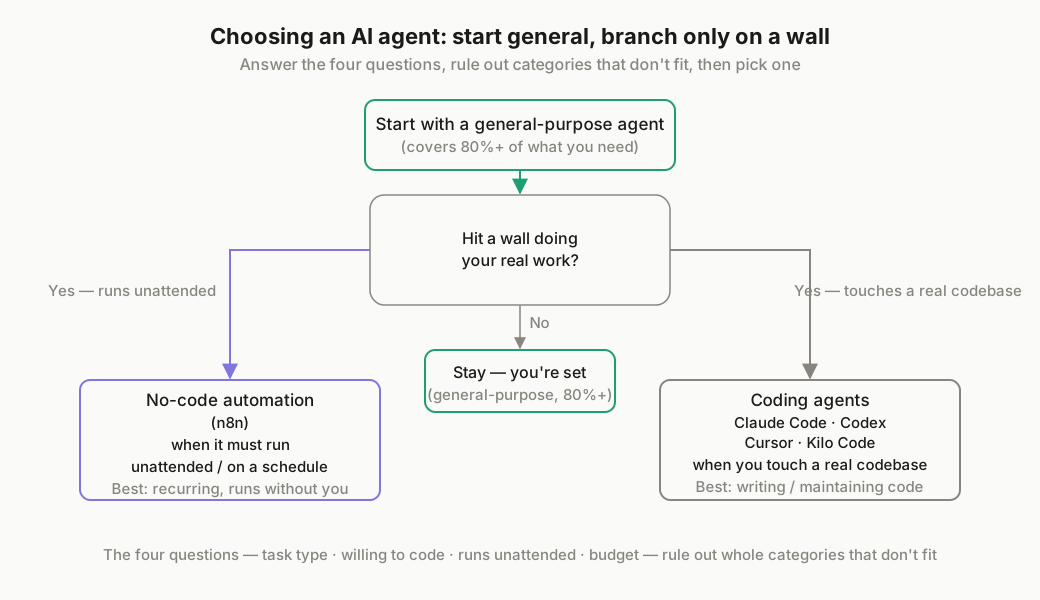
If you're still unsure after the four questions, here's the honest shortcut: start with a general-purpose agent. It's the lowest-risk entry point, requires no code, and covers the majority of what most people actually ask an agent to do. You'll find out fast whether your needs are bigger than that — and if they are, you'll know exactly which of the other two categories to move toward, because you'll have hit a concrete wall (needing it to run unattended, or needing it to touch a real codebase) rather than guessing in advance.
Once you've settled on a general-purpose agent and want it running reliably instead of just on your laptop, the next practical step is setting it up to run 24/7 on a VPS — that's usually the point where people move from "trying an agent" to actually depending on one.
You don't need to pick the "best" agent. You need to pick the one that matches the job in front of you right now — and switch later if the job changes. That's a much smaller decision than it feels like from the outside.