Grok Bot vs Codex: It's Not Local vs Cloud, It's "Whose Computer Is Doing the Work"
If you've seen Grok Bot mentioned this month, you've probably also seen it described as "the cloud version of Codex" or "xAI's answer to coding agents." Neither is quite right. For this comparison, "Codex" means its local desktop-app and CLI modes unless noted otherwise; Codex also supports cloud-delegated workflows, but those follow a different execution model.
Both Grok Bot and Codex can touch your local files. Both can reach out onto the internet. The real difference isn't whether they can work locally or online — it's which one is the default home base, and what happens to networking and file access when they leave it. Once you see that, the rest of the comparison — pricing, security model, who each one is actually for — falls into place a lot faster.
One quick note before we start: "Grok" now covers three different things — the @grok chatbot you tag in X replies, Grok Build (xAI's coding-focused CLI agent, closer in spirit to Codex), and Grok Bot, the persistent "AI teammate" this article is actually about. If you've seen all three mentioned in the same breath somewhere, that's why. On the Codex side, this comparison stays focused on the local desktop app and CLI, where the relevant file-editing and sandboxing decisions happen. IDE extensions broadly follow that local model, supported desktop chats can be accessed remotely from mobile, and some capabilities (like switching to a local or third-party model) live in a config file rather than a UI toggle.
The short version
| Grok Bot | Codex (local desktop app and CLI) | |
|---|---|---|
| Default home base | xAI's cloud computer | Your local project and workspace |
| Always on? | Yes — keeps running after you close your laptop | Usually task- and chat-oriented, with separate support for long-running and scheduled work |
| Networking by default | The cloud computer can browse the live web; account access begins only after you sign in or grant it | Command-sandbox networking is off by default; other tools follow separate controls |
| Reaching "the other side" | Optional, bolt-on local-execution feature, approved command-by-command | External tools, plugins, connectors, and MCP are configured and permissioned separately |
| Interface | Desktop on macOS, Windows, and Linux; mobile on iPhone, iPad, and Android | Desktop app, CLI, and IDE extensions; supported desktop chats can be accessed remotely from mobile |
| Model flexibility | Locked to xAI models, subscription-gated | Open — connects to OpenAI's own models, third-party APIs, or local models, via config rather than a built-in switcher |
| Entry price | Currently starts around $20/month (see pricing section) | Free client and free plan available; paid ChatGPT plans and API usage add capacity |
Now let's get into why each row is true.
Persistent teammate vs. one-off task
Grok Bot's whole pitch is that it doesn't stop when you do. Each user gets a persistent cloud computer with a browser, filesystem, and terminal, shared by that user's Bots. It keeps working when you close the laptop or your phone goes to sleep. You come back later and it's either finished, blocked on something it needs your approval for, or still going.
Codex can also run long-running and scheduled work — the desktop app has a Scheduled Tasks feature for exactly this — but its core experience is still organized around projects, chats, and scoped tasks rather than a named teammate with a persistent cloud computer. Local scheduled work may require the desktop app and computer to remain available.
This is the single biggest reason these two get lumped together despite being built for different jobs. Grok Bot is closer to hiring a remote employee. Codex is closer to handing someone a specific assignment and waiting for it back.
Whose computer is actually doing the work
This is where the "local vs. cloud" framing breaks down, and where it gets genuinely counterintuitive.
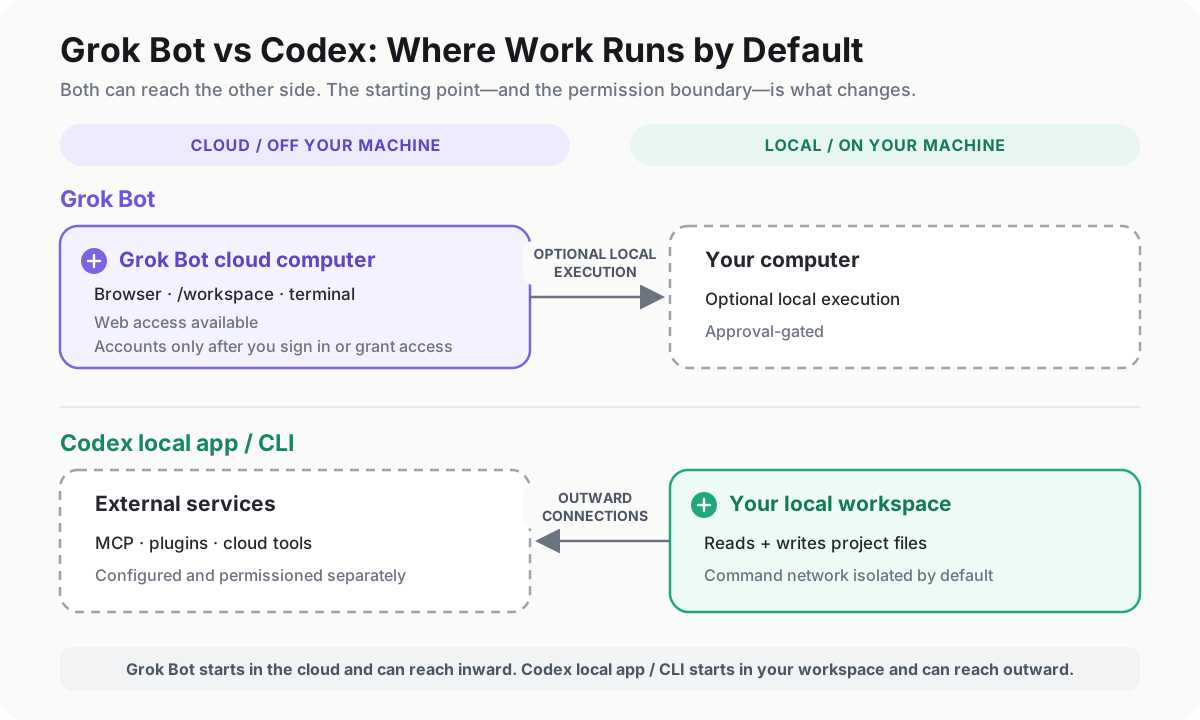
Grok Bot's default working surface is its own cloud computer — not yours. It has its own browser, its own filesystem (a shared /workspace folder), its own terminal. Reaching your actual laptop is a separate, optional capability: enable Execution on Local Computer, where local commands require approval by default. In other words, the "local" side of Grok Bot is bolted on, off by default, and gated.
Codex runs the opposite way in the local desktop-app and CLI modes covered here. It reads and writes the project files on your machine directly — that's the point of choosing a local environment. Reaching outward is separately configured: it can connect to external tools through MCP, plugins, connectors, browser tools, or cloud workflows, with their own permissions.
So the direction of "which side is the default and which side is the add-on" is flipped between the two products, even though both technically support "local" and "cloud."
Networking: the counterintuitive part
Here's the detail that surprises people. You'd assume the cloud-based agent is the "more connected" one and the local CLI tool is more locked down — and in one sense that's true, but not in the way most people expect.
Grok Bot's cloud computer is designed to stay connected: it can browse the live web and operate applications and websites through computer-use, the same way a person at a keyboard would. That doesn't give it blanket access to your accounts. It can use the accounts, plugins, and credentials you explicitly connect or sign into; until then, internet connectivity and account access are two different things.
Codex's default workspace-write command sandbox does the opposite by default: network access is disabled for commands unless you enable it or approve an escalation. Browser, web-search, plugin, MCP, and cloud connections use separate controls. Isolation is the default for local command execution; connectivity is something you grant when required.
So the actual contrast isn't "cloud is open, local is closed." It's: Grok Bot starts from a web-connected cloud computer, then gains access to specific accounts and tools as you grant it. Codex's local command environment defaults to isolated, because its job is editing files safely without an agent accidentally reaching out to the internet mid-task.
Two different approval philosophies
The two products also disagree on how permission should work, which follows naturally from the architecture above.
Grok Bot's controls are built around individual actions: Allow once, Deny, or Always allow, plus "Auto Review" rules that can either pause for a human sign-off or proceed automatically under conditions you define. Worth knowing — multiple named Bots can share the same cloud computer, and xAI is explicit that separate Bots are not separate security boundaries. Files, browser sessions, and even command-line credentials on that machine can be visible across Bots.
Codex's controls combine sandbox modes with approval policies. In practice, you choose how far the agent can write or reach the network, then decide which actions require approval; automatic review can also evaluate eligible approval requests.
Neither approach is strictly safer. Grok Bot's model makes sense for a long-running, multi-app teammate; Codex's model makes sense for a bounded, reviewable coding task.
Model lock-in vs. model freedom
This is the part that doesn't get talked about enough, and it's a direct extension of "whose computer is this."
Codex's architecture is open by design, though not through a button in the desktop app — you set it up by editing a config file (~/.codex/config.toml) to add a model provider profile. That means you can point Codex at something other than OpenAI's own models — including a third-party API like DeepSeek, if you'd rather not pay per-token OpenAI pricing for everything, or a local model via Ollama. We've walked through exactly how to do that here: How to Use DeepSeek V4 Flash with Codex.
Grok Bot doesn't currently offer that door. The model, the compute, and your account access are all part of one xAI-run system, and getting in means going through one of xAI's own subscription tiers. That's the trade-off of the "persistent cloud teammate" architecture: the convenience of not managing any infrastructure yourself comes with being locked into whoever runs that infrastructure.
What it actually costs (and why this number keeps moving)
This section changed twice while researching it, so treat these figures as a snapshot rather than a fixed price — worth checking x.ai/bot or Cursor's pricing page before you commit to anything.
At the time of writing, the lowest listed individual entry point is Cursor Pro at roughly $20/month, while team access starts around $40/seat/month. SuperGrok and higher Cursor tiers provide other routes in, with different included usage. Each eligible plan comes with a weekly Grok Bot usage allowance, and eligible accounts can add on-demand usage billed from model and token costs.
Codex's client is open source and a free plan is available. You can install the CLI with npm install -g @openai/codex or Homebrew, while paid ChatGPT plans and API-key usage provide additional capacity. Third-party or local model providers are also possible when configured (see the DeepSeek link above); there isn't a separate product tier called "Codex" to buy into.
If you're weighing whether either of these is worth paying for at all, our Free vs. Paid AI Agents: The 2026 Budget Guide is a useful gut-check before you commit to a monthly plan.
So which one is actually for you
- You want something that keeps working on real, multi-step business tasks — sales outreach, inbox triage, recurring ops — without you babysitting it: that's what Grok Bot is built for. Just go in accepting the current subscription floor and the fact that it's still an early beta with limited independent testing behind it.
- You want to hand off a bounded coding task, get a reviewable result back, and stay in control of exactly what model and what tools are involved: that's Codex's lane, with free, subscription, and API-key usage options.
- You're trying to figure out where either one fits next to the rest of the desktop-agent landscape (Claude Code, Cursor, and others), our broader Claude Code vs. Codex vs. Cursor comparison covers that ground.